


Goat Rampage
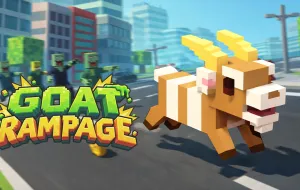
Goat Rampage is a fast-paced arcade destruction game that puts you in control of a runaway goat charging through a colorful voxel-style city. Instead of following a traditional racing track or completing fixed missions, your goal is to travel as far as possible while smashing objects, collecting coins, and avoiding dangerous obstacles. Police vehicles, robots, zombies, traffic, and other hazards can quickly bring your run to an end.
GOAT RAMPAGE - SMASH THROUGH THE CITY AND SURVIVE THE CHAOS
The core gameplay of Goat Rampage is built around continuous movement and quick steering decisions. The goat keeps moving forward automatically, leaving you to guide it from side to side as the city unfolds ahead. You need to scan the route, identify safe openings, and decide which objects are worth hitting without putting the entire run at risk.
Smash Objects and Collect Coins
- Crash into suitable objects as you move through the city.
- Collect coins scattered along safer sections of the route.
- Use destruction and pickups to increase your rewards.
- Avoid wasting time chasing a coin when the route is dangerous.
- Focus on extending your distance while creating as much chaos as possible.
Dodge Enemies and Traffic
Police, robots, zombies, vehicles, and environmental obstacles can block your path. Quick left and right adjustments are often safer than making large movements at the last moment. Looking farther ahead also gives you more time to choose a route before a hazard reaches the goat.
Use Turbo at the Right Moment
Turbo is one of the game's most important mechanics. On the current browser version, holding both movement keys activates a burst of speed and destructive power. This can help clear a crowded section or create distance from danger, but the extra speed also reduces the time available to react. Saving Turbo for a useful moment is therefore more effective than activating it constantly.
Controls
- A / Left Arrow: Move left
- D / Right Arrow: Move right
- Hold both movement keys: Activate Turbo
- Mouse / Left Click: Navigate menus and select options
SIMILAR GAMES