


Racing Limits
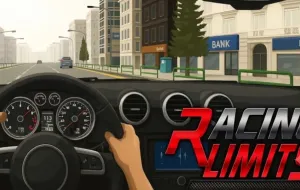
Racing Limits is a 3D racing game developed by Valvole. Instead of competing only on traditional racetracks, in this game, players weave through everyday traffic, chase high speeds, and test their driving precision across different environments.
RACING LIMITS - MASTER THE ART OF HIGH-SPEED OVERTAKING
In Racing Limits, success depends on finding the right balance between speed and control. Drive along busy roads, pass slower vehicles, and react quickly when traffic patterns change. Close overtakes can reward skilled driving, but careless lane changes may end your run in a collision. You can adjust traffic conditions to suit your ability and gradually take on more demanding challenges. Whether you prefer a relaxed drive or a race against the clock, each run gives you another opportunity to sharpen your reflexes and improve your performance.
Choose Your Challenge: Four Ways to Drive
- Career Mode: Complete a series of racing challenges and earn rewards as you progress.
- Infinite Mode: Stay on the road for as long as possible and aim for a new distance record.
- Against-Time Mode: Complete objectives before the countdown expires.
- Free Mode: Explore the roads and practice your driving without the pressure of a specific event.
Driving From City Streets to Open Highways
- City: Navigate tighter spaces and heavier traffic that demand careful lane changes.
- Highway: Build speed while watching for sudden changes in the flow of vehicles.
- Desert: Enjoy a more open setting where you can focus on acceleration and overtaking.
- Changing conditions: Choose morning, sunset, or night, then adjust between one-way and two-way traffic for a different driving challenge.
Build a Garage That Matches Your Driving Style
- Unlock more cars: Use your earnings to expand your collection of sports and performance vehicles.
- Improve performance: Upgrade important attributes such as acceleration, top speed, braking, and handling.
- Customize your look: Personalize available vehicle details, including body and rim colors.
- Select strategically: A well-balanced car can be easier to control in dense traffic than one focused entirely on maximum speed.
Keyboard Controls for Precision Driving
- Up Arrow / W: Accelerate.
- Down Arrow / S: Brake or slow down.
- Left and Right Arrows / A and D: Steer between lanes.
- F: Activate nitro.
- C: Change camera view.
- E: Sound the horn.
- W and D: Shift gears when manual transmission is enabled, depending on the active control layout.
TAKE THE COMPETITION BEYOND SOLO DRIVING